Dark Web Scams: Verify the Claim Before You Act
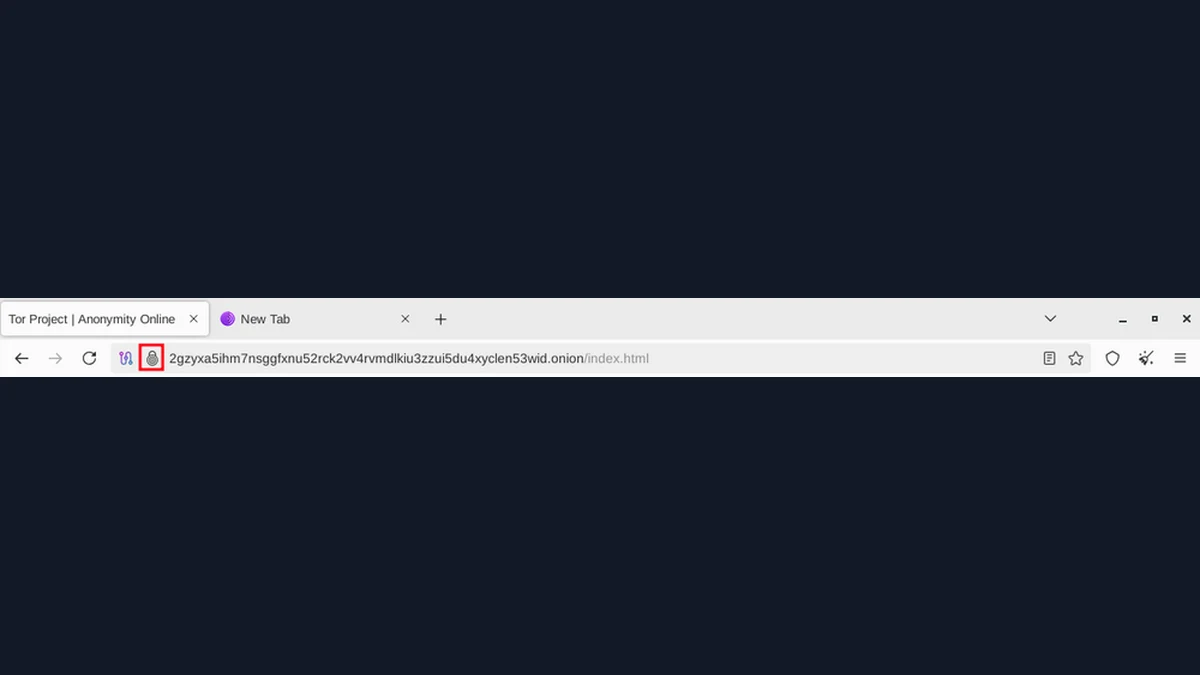
An encrypted connection can carry a convincing scam. Dark web scams often exploit the same weaknesses as ordinary phishing: an urgent message, familiar branding and a request to act before checking the sender. An onion indicator does not prove that the operator is the organization they claim to be. You can reduce the risk by verifying the claim through an independent official channel and limiting what you disclose. If you already entered a password or ran a suspicious file, switch from evaluating the message to a defined account or device recovery process.
Dark Web Scams Borrow Trust from Familiar Names
A page can copy the appearance of a privacy project, publisher or support service without being operated by it. A logo and familiar wording are easy for a reader to recognize, but they are not sufficient evidence of who controls the destination.
Consider a hypothetical message announcing an urgent update to a privacy browser. It links to a page with the expected branding and a download button. The useful question is not whether the design looks professional; it is whether the official project independently confirms that download and route.
The same pattern can appear in a breach alert, a supposed account-recovery message or a request to move a conversation to a new address. Urgency encourages the reader to accept the sender's chosen destination as part of the story.
Separate the claim from the action requested. You can check whether a project released an update without using the message's installer. You can check an account through the provider's established interface without signing into a linked copy. That separation removes the attacker's control over the first verification step.
An Onion Indicator Does Not Identify the Organization
Tor Browser's onion-service features help explain the kind of connection being made. They do not independently confirm that the service's claimed real-world identity is accurate. An attacker can operate their own onion service and display the name of an unrelated organization.
The onion address is tied to the service's cryptographic identity. That can authenticate the address you are reaching while leaving the reader's original choice of address mistaken. A copied name is not a substitute for obtaining the intended address through a trusted channel.
For a hypothetical news organization, check whether its established official website publishes the onion address. If the organization uses signed announcements, authenticate the signing key through its official process as well. A valid signature from an unknown key does not resolve the identity question.
This is the central problem with fake onion links. The connection may work exactly as designed while leading to the wrong operator. Do not search for a browser icon that can certify the whole situation. Verify the relationship between the address and the organization before sending credentials, documents or other sensitive information.
A Fake Breach Alert Can Create the Exposure It Predicts
A message claiming that your details have leaked may contain enough accurate information to feel persuasive. An email address or old account name can be obtained without proving that the sender is a legitimate monitoring provider. Treat the message's account-access request separately from its claim about a breach.
In a hypothetical dark web phishing attempt, the sender offers a scan that asks for your current password or a one-time authentication code. Those details can give the attacker fresh access. Using Tor to open the page would not make it safe to submit them.
Check the account through the provider's established application, a trusted bookmark or independently verified contact information. Look for a notice there or ask the provider's support route whether action is needed. Do not use the suspicious message's reply address as the only confirmation channel.
If an exposure is confirmed, respond to the actual information involved. An email match is not automatically proof of an account takeover, and a password exposure requires more than deleting the notification. The dark web monitoring guide explains how to prioritize credentials, sessions and recovery settings without seeking out stolen records.
If You Entered a Password or Ran a File
The appropriate response depends on what happened. Opening a page, submitting credentials and executing an installer are different events. Avoid treating every case as identical, but do not let uncertainty delay a relevant account-recovery step.
- Stop interacting with the suspicious page or sender.
- Use an established provider route on a trusted device.
- Replace exposed passwords and any reused copies.
- Review active sessions, recovery settings and connected applications.
- Contact organizational support if a work account or device is involved.
- Seek appropriate device-recovery help if you executed untrusted software.
For a hypothetical fake installer, changing a password on the same potentially compromised device may expose the replacement too. Use another trusted device for sensitive account recovery when possible, and follow the relevant device or organizational guidance.
Do not assume that one malware scan proves a device is clean or that a password change always revokes every session. Follow the provider's specific recovery controls. If money or identity documents were involved, contact the relevant institution through independently verified details rather than relying on the sender's promised refund or removal service.
What Official Guidance Says About These Patterns
FTC phishing guidance recommends contacting an organization through information you locate independently. This matters because an accurate-looking message can still choose a malicious sign-in destination. Verification should not depend entirely on material supplied by the suspected sender.
Tor Project's onion-service documentation explains connection indicators and address behavior. It supplies a technical reason not to confuse an encrypted onion connection with proof of the operator's claimed identity.
Tor Browser's safety guidance warns about external documents and extra applications. A hypothetical attachment downloaded through Tor may later open in software with different network behavior. The original connection does not make the file trustworthy.
The project's signature-verification guidance adds another limit: the signing key must be the expected one. A fake privacy-software page can provide its own signed file, so the reader needs an authenticated publisher key rather than merely a good-signature message. Together these official sources point to independent verification of the sender, address, file and account workflow, rather than a single visual badge that supposedly certifies everything.
Build One Independent Verification Habit
Choose one routine that removes the message sender's control over your next action. For an account warning, open the provider yourself. For a software update, use the official project route. For a changed contact address, confirm it through the organization's established channel.
Keep trusted bookmarks for services you use regularly, while remaining alert to legitimate changes and account notices. A bookmark reduces dependence on an unsolicited link, but it is not a permanent guarantee that the service or device can never be compromised.
For a hypothetical user who receives repeated recovery offers, record which provider is actually affected and what official steps have been completed. This makes it easier to spot a new sender promising a result that the real provider has not offered. Do not pay a stranger solely because they claim they can remove every leaked copy or recover an account through a secret route.
The useful step today is to review one important account's official recovery instructions and save its verified support route. Knowing where to go before an urgent message arrives makes it easier to pause, check the claim and avoid handing the sender another piece of access.
Sources and official tools
- support.torproject.org: onion features
- support.torproject.org: safety
- consumer.ftc.gov: ftc
- Tor Browser: official download
- FTC: recognizing and avoiding phishing scams
Official references checked when this guide was written. Product links contain no affiliate tracking.
Frequently asked questions
How do I spot a fake Tor website?
A familiar logo or onion indicator is not enough. Confirm the intended address through the organization's independently located official channel. If it publishes signed announcements, authenticate the signing key rather than accepting an unknown key with a familiar name.
Are fake onion links always broken?
No. An attacker can operate a working onion service under their own address. The connection can function correctly while the operator misrepresents who they are.
What if I typed my password into a fake page?
Use the real provider's recovery route on a trusted device and replace the exposed password, including any reused copies. Review sessions, recovery details and connected applications. Follow additional provider or workplace instructions for the affected account.
Can a scammer remove all my leaked data?
A promise to delete every independent copy is not something a stranger can reliably guarantee. Check the exact service and the organization offering it through an independent route. Do not provide credentials, recovery codes or payment solely because an unsolicited message claims urgent action is required.