Deep Web vs Dark Web: Compare Access, Privacy and Risk
You use the deep web when you open a private account page that a search engine cannot index. Deep web vs dark web is therefore a comparison between different ideas: search visibility on one hand, and services requiring a particular network connection on the other. An onion service can be public, while an ordinary website can contain confidential records. Neither label tells you that a page is trustworthy. The practical questions are who can access it, how you connect, and what information you expose once you arrive.
Deep Web vs Dark Web: Use Three Separate Questions
The difference between deep web and dark web becomes clearer if you stop treating them as levels on a single ladder. Ask whether a search engine can index the content, whether a visitor needs permission to read it, and whether reaching the service requires a particular network.
- Search visibility: Can the content appear in ordinary search results?
- Access control: Does the application require an account or another form of permission?
- Connection method: Does the service use ordinary web access or a network such as Tor?
Imagine a hypothetical library that offers a searchable public catalog and a members-only document collection. The documents may be absent from public search engines because the crawler cannot sign in. The library could also offer its public catalog as an onion service. That would change the connection without making the catalog members-only.
These questions avoid a common mistake: assuming that a page is dangerous because it does not appear in Google. They also prevent the opposite mistake, assuming that a publicly searchable page has passed a meaningful safety review.
Deep Web Examples You Already Recognize
An email inbox is a useful example because the website and its private content have different visibility. A search engine may index the provider's login page, but it should not be able to read your messages through that page. Authentication and authorization determine which messages your account can access.
Other deep web examples include an appointment dashboard, an internal company document system and results produced after a private database query. Some content is unindexed because it is protected, while other content is simply difficult for a crawler to discover. Lack of indexing is not itself a security control.
For instance, a hypothetical organization might share an unlisted URL with staff. If the application does not check permissions, someone who obtains the address may still be able to open it. Hiding a link is weaker than verifying that the visitor is entitled to the information.
This distinction matters to ordinary users too. Use the provider's privacy and account controls rather than assuming a document is private because a search for its title returns nothing. Visibility can change without the underlying document changing.
How an Onion Service Differs
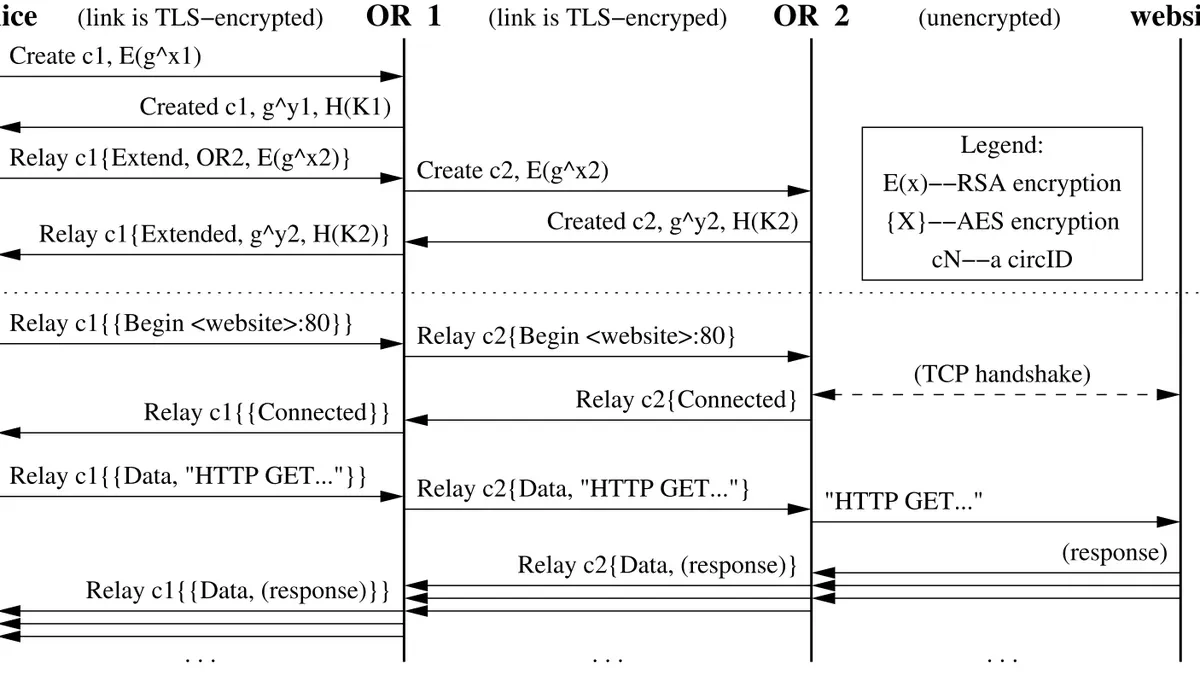
Tor onion services use addresses tied to a service's cryptographic identity and connections carried through Tor. A standard browser using an ordinary direct internet connection does not resolve and reach them in the same way as normal websites. Tor Browser provides one supported way to make the required connection.
An onion service can still present a login screen, public articles or an application. The operator chooses its access rules. Tor does not automatically turn a public page into a confidential space, and a username submitted to the application remains visible to that application.
Tor Project documentation describes how onion connections protect the network locations of the service and visitor. That is different from deciding whether the person behind a service is the organization they claim to represent. An attacker can run an onion service with convincing branding of their own.
Consider a hypothetical publisher with both ordinary and onion versions of a public article. The reader should confirm the onion address through the publisher's established channel. The connection can authenticate the address being visited without independently authenticating the publisher's claimed real-world identity.
Which Privacy Properties Actually Matter
An ordinary HTTPS account page can protect sensitive content in transit and restrict it to an authenticated user. An onion service can add different network-location protections. These features can coexist, and neither replaces careful account management or the need to trust the application with information you submit.
- An account login can control access, but it identifies the account to the provider.
- HTTPS can protect transmitted content, but it does not make the provider unable to read that content.
- Tor can reduce exposure of the visitor's network address, but it cannot remove identifying details from a message.
Suppose you use Tor Browser to sign into your usual email account. Your connection path changes, but the account remains the same. It would be misleading to describe that session as anonymous to the email provider.
Likewise, moving a file to an unindexed URL does not remove names or location details from the file. The practical comparison is between specific protections and specific risks. The broad label attached to the page supplies much less information than the account controls, connection and content do.
What the Official Guidance Adds to the Comparison
Tor Project's onion-service documentation explains the connection mechanism. It gives a technical reason to distinguish an onion service from an ordinary unindexed page: the service's network location is handled differently.
Tor Browser's safety guidance warns that other applications are not automatically covered by the browser's connection. This matters when a private portal offers a document download. The browser used to retrieve the file does not determine every connection that a separate document viewer might later make.
The same guidance discusses identifying yourself through account use or submitted information. For a hypothetical reader using a health portal, the provider must know which account is requesting the record. A privacy network does not remove that relationship.
Tails documentation describes further limits involving device compromise and persistent data. That adds another separate question: what information remains on the device after browsing? Search visibility tells you nothing about local downloads, saved credentials or browser data. These documented distinctions are a better basis for decisions than an unsupported diagram claiming that one part of the internet has a particular size or inherent level of danger.
Apply the Comparison to One Real Account
Choose an account you already use and examine its actual protections. Look at the official login route, whether multifactor authentication is available, how active sessions are managed, and what happens when a file is downloaded. None of those checks requires visiting an unfamiliar network or handing credentials to a scanner.
- Locate the provider through a trusted bookmark or independently typed address.
- Review its account-security and recovery settings.
- Check where downloaded records are stored on your device.
- Remove access you no longer need, following the provider's controls.
If your original question was whether the deep web is illegal, the label alone cannot settle it. Permission, conduct and applicable law matter. A private work account can contain information you are authorized to read, while another person's account does not become yours to access because its login page is public.
The next useful step is to check one account's active sessions today. That addresses a concrete exposure. It is more informative than deciding that everything outside a search engine is either safe, suspicious or inaccessible.
Sources and official tools
Official references checked when this guide was written. Product links contain no affiliate tracking.
Frequently asked questions
Is deep web illegal?
The term includes ordinary private accounts and databases. Whether an activity is lawful depends on permission, conduct and the applicable rules, rather than whether a search engine indexes the page. Another person's private account is not yours to access without authorization.
Do I need Tor to access the deep web?
You do not need Tor for an ordinary email inbox or private account page. Those applications normally work through their usual browser connection and login controls. Tor onion services are a different case.
Is the dark web always private?
An onion service can publish content openly to anyone with a compatible connection. Its network properties do not automatically impose an account requirement or make the operator trustworthy.
Is an unlisted link secure?
An unlisted address may be hard to discover, but that is not the same as enforcing permissions. Treat a document as properly restricted only when the application checks who is allowed to access it.