Tor Bridges: Understand the Entry Connection
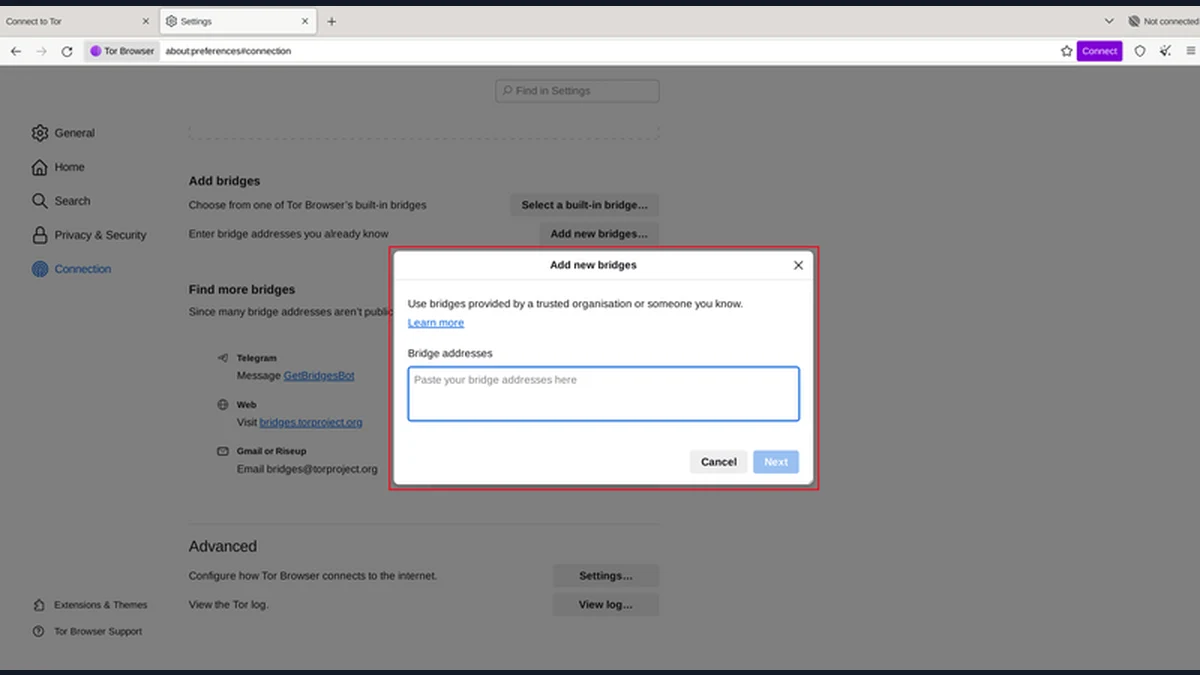
Tor bridges are alternative entry points that can help when connecting to Tor through the normal route is blocked or difficult. They are not exit relays, and they do not make a connection invisible to every observer. If Tor Browser is not connecting, first separate a general internet problem from a Tor-specific restriction. The browser's supported connection assistance and official bridge guidance provide a better starting point than copied addresses from strangers. Use one change at a time so you can tell which part of the connection is failing.
What Tor Bridges Change
A bridge is a Tor relay used as an alternative entry point whose details are not distributed through the same public relay listing as ordinary entry relays. Some bridge configurations also use transports designed to make blocking more difficult. Availability and effectiveness depend on the network and the method used.
The bridge is at the start of the connection. It is not the ordinary exit used to reach a clearnet website, and choosing a bridge is not a way to choose a destination country's exit address. Those are different roles in the network.
For a hypothetical reader whose network blocks known Tor entry connections, an alternative entry method may allow the browser to reach Tor. That success does not establish that the reader's device is trustworthy or that a website cannot identify a signed-in account.
Tor Project documentation describes bridges as a response to connection and censorship problems. That is the right scope for the feature. Avoid claims that a bridge makes all traffic unrecognizable, eliminates every surveillance risk or necessarily improves browsing speed.
Check the Basic Connection Before Changing Tor
If Tor Browser is not connecting, confirm that the device has working internet access and that its clock is set appropriately. A local connectivity problem can affect Tor without being evidence of deliberate blocking. A network login requirement can also be distinct from Tor's own connection process.
Read the connection status and any supported troubleshooting information provided by the browser. Do not solve an unexplained error by disabling unrelated protections or installing an unknown replacement browser. The goal is to identify the failing step, not simply to make a warning disappear.
In a hypothetical hotel connection, the device might need to complete the network's ordinary access process before Tor can connect. In another situation, normal web access may work while Tor's direct entry is restricted. These cases can look similar if the only observation is that a page did not load.
Keep the changes small and note what happened. Checking general access, then the Tor connection, then the destination page gives you a clearer diagnosis than changing the clock, bridge, VPN and browser settings at once. A successful connection test should correspond to the specific problem you were trying to fix.
Use the Official Bridge Workflow
Tor Browser includes supported connection controls and guidance for using bridges. Follow the current official instructions for the browser version and platform rather than an old screenshot or a copied command. The supported choices can change as the project responds to connection conditions.
Obtain bridge information through official Tor channels. A random message offering a special bridge may also try to persuade you to install unrelated software or disclose information. You should not need to give an unknown person an account password or payment details to understand the official process.
When manually entering bridge lines under the documented workflow, keep each complete bridge entry on its own line. Partial, altered or combined entries can fail. Do not publish private bridge details in a public support screenshot merely to show that a connection did not work.
For a hypothetical user following a help page, the important check is that the page belongs to the official project and that the instructions match the browser's supported controls. This guide deliberately provides no live bridge addresses, since their availability changes and copying one here would bypass the appropriate source.
Test One Change and Interpret the Result
After selecting a supported connection option, allow the browser to attempt the connection and inspect its reported state. If it succeeds, confirm that an ordinary page can load. If it fails, record the relevant error without publishing information that the official support guidance treats as sensitive.
- Confirm the underlying internet connection.
- Follow the browser's official connection-assistance route.
- Select or obtain a supported bridge option.
- Enter complete bridge lines as documented, if required.
- Retry the connection and note the result.
- Consult official troubleshooting guidance before adding unrelated software.
In a hypothetical case where Tor connects but one site fails, changing bridges repeatedly may not address the problem. The destination could be unavailable, challenge Tor traffic or depend on a browser feature affected by the security level.
Conversely, a working destination page does not prove that every activity on the device uses Tor. Keep the success criterion narrow: the browser reached Tor and the intended page loaded through its supported connection. Other applications and account identities remain separate checks.
Three Limits Documented by the Tor Project
The official bridge guidance explains that a connection method can work differently across networks. This matters because a bridge that works in one place is not a guarantee for another, and availability can change. Treat an unsuccessful attempt as troubleshooting information rather than proof that Tor is universally unavailable.
The network overview describes limits involving observation of traffic at both ends. A bridge changes how you enter the network; it does not remove every broader observation risk. This distinction prevents a connection workaround from being oversold as complete anonymity.
Tor Browser's safety guidance keeps account identity and external applications in view. If a hypothetical reader uses a bridge and then signs into an existing account, the provider still sees that account. If the reader opens a document in another application, that application's connection is still a separate concern.
These documented boundaries explain why bridge troubleshooting should remain focused. The relevant outcome is access to Tor under the local connection conditions. It is not a certification of the device, the destination's operator or everything the user does after connecting.
Keep a Simple Connection Plan
Choose a supported connection method and keep enough context to repeat the official process if the network changes. Avoid building a collection of unverified bridge lists, replacement browsers and extra privacy tools that you no longer understand. More dependencies can make the next failure harder to diagnose.
For a hypothetical traveler, the useful preparation is knowing where the official connection guidance is and understanding which network or device restrictions may apply. It is not assuming that one copied bridge will remain usable everywhere.
If you need help, use the Tor Project's established support route and follow its advice about what diagnostic information to share. Remove unrelated personal details from screenshots. Do not publish complete bridge information merely because someone in an unsolicited message requests it.
The next step today is to open the official bridge instructions and compare them with your browser's connection controls. If you currently have no connection problem, you do not need to change a working setup just to add another feature. When a problem does appear, work through the underlying network, Tor connection and destination in that order.
Sources and official tools
Official references checked when this guide was written. Product links contain no affiliate tracking.
Frequently asked questions
What are Tor bridges?
They are alternative entry points that can help connect to Tor where normal entry connections are restricted. Some configurations use transports intended to make blocking more difficult. A bridge is not the exit relay used to reach an ordinary website.
Do bridges make Tor faster?
They are primarily a connection and censorship-circumvention feature, not a speed guarantee. Performance depends on the network, method and available capacity. Use the result of an actual connection test rather than a general promise.
Where should I get Tor bridges?
Use the official Tor connection and bridge channels. Follow the current instructions for your platform, and keep complete manual entries on separate lines where required. Do not rely on an unsolicited message asking for credentials or additional software.
Why is Tor Browser not connecting with a bridge?
The underlying internet connection, local restrictions, bridge availability or entered configuration may be involved. Check the browser's reported state and work through official troubleshooting one step at a time. A single unavailable website is a different problem from failing to connect to Tor.