Tor vs VPN: Choose by What You Need to Protect
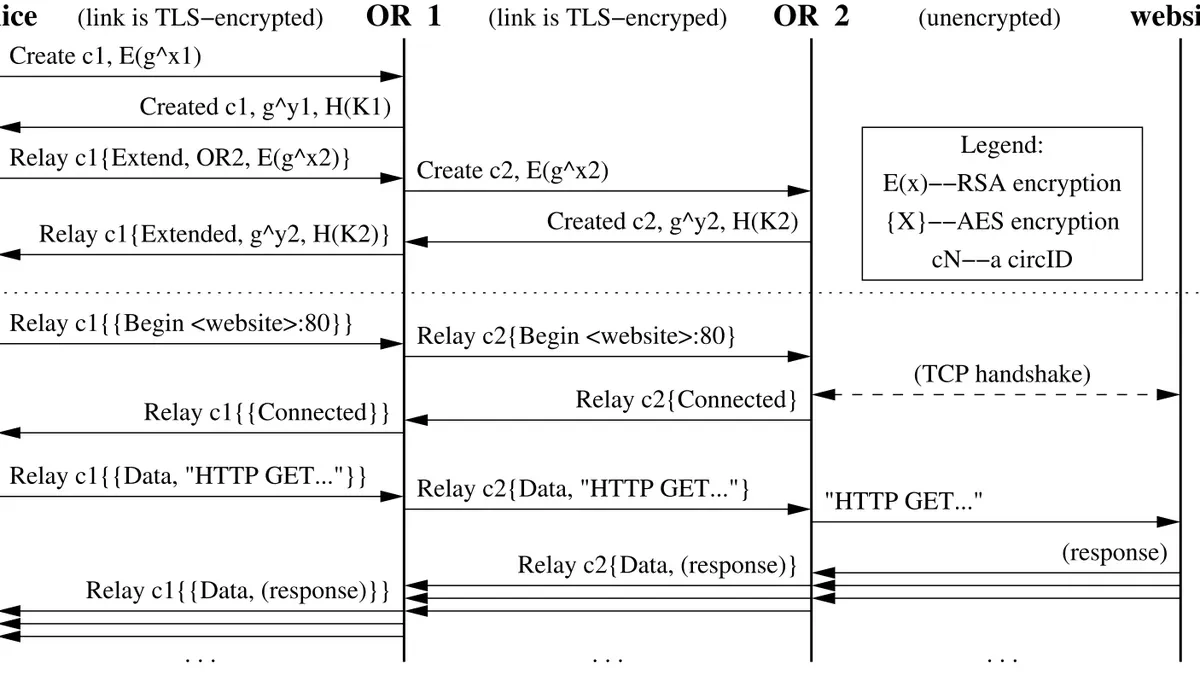
The useful Tor vs VPN question is who can observe your connection and what information you want to protect. Tor Browser routes its browsing traffic through Tor and includes browser privacy defenses. A VPN carries configured traffic through a provider's server, changing which intermediary you rely on. Neither makes accounts, messages or a compromised device anonymous. A VPN is also not a prerequisite for Tor. Compare the scope and trust involved before paying for another service or trying to combine both.
Tor vs VPN: Start with Traffic Coverage
Tor Browser is a browser with an integrated Tor connection and privacy protections. Its presence on a computer does not mean that unrelated applications use Tor. A game, email application or document viewer can still have its own network behavior.
A VPN application can route more of a device's traffic through a tunnel, depending on its configuration. Full-tunnel and split-tunnel arrangements have different coverage, and excluded applications or network exceptions can matter. Do not assume every application is protected merely because a VPN icon says connected.
- Tor Browser: assess the browsing task and any files opened outside it.
- VPN: check which traffic the configured tunnel actually includes.
- Either option: consider information disclosed through accounts and messages.
Suppose a hypothetical reader uses a browser and a separate video-call application. Starting Tor Browser does not change the call application's route. A VPN might include it, but only if the configuration does so. This traffic-scope check is the first practical difference between Tor and VPN, before making broader claims about privacy or speed.
Where You Place Trust
Tor separates the views available to different relays in a connection. For ordinary web browsing, an entry relay and an exit relay have different roles and visibility. This design reduces dependence on one intermediary knowing both the visitor's direct network address and destination.
A VPN provider carries the traffic routed through its service. It may observe connection information such as addresses and timing, while HTTPS can still protect the contents of a browser's connection to a website. The provider does not automatically receive the decrypted contents of every HTTPS page simply because it carries the traffic.
Provider policies, implementation and the surrounding threat matter. A no-logs statement is a claim to evaluate, not a technical consequence of the word VPN. This guide does not certify a provider's current practices or make an audit claim about a particular service.
For a hypothetical user concerned about their local network operator, moving traffic into a VPN tunnel changes that operator's view. It also creates a relationship with the VPN provider. The decision is therefore about which party is trusted with which information, rather than removing trust from the connection altogether.
Browser Identity Is a Separate Layer
A VPN changes the route and visible network address for covered traffic. It does not, by itself, clear website cookies, remove an account identity or standardize the browser's configuration. The destination can still identify a user who signs into an existing account.
Tor Browser includes defenses intended to reduce browser tracking and fingerprinting. Those protections are part of the browser, rather than a feature that every application acquires simply by using Tor. Adding unusual extensions or customizations can change that behavior.
In a hypothetical Tor Browser vs VPN comparison, use the same account on the same website. Both connections may conceal the user's direct IP address from that website, but the account still supplies an identity. The result is not anonymous to the account provider.
This also explains why a VPN should not be described as device isolation. Malicious software on the device, identifying document metadata and information typed into a form remain separate concerns. Decide whether your problem is the network path, browser tracking, account identity or device integrity before choosing a product to address it.
Speed and Compatibility Need Realistic Expectations
Tor connections can add latency because traffic crosses several relays and available network capacity varies. A VPN also adds a path through another server, with performance depending on distance, congestion, configuration and the underlying connection. Neither label establishes a reliable speed result for every user.
Websites may challenge or restrict connections from shared Tor or VPN addresses. Tor Browser's security levels can additionally affect features such as JavaScript and media. A page failing to load can therefore involve several different issues, not just an inadequate connection.
For a hypothetical user trying to submit a form, first distinguish a network error from a script-dependent page or an account challenge. Repeatedly switching providers will not necessarily fix a browser feature the page requires.
The Tor Project warns against torrent use with Tor, including risks involving application behavior and network load. That warning should not be stretched into a claim that every large download is impossible or every video identifies its viewer. Match the task to the supported software and actual connection conditions, and avoid performance promises unsupported by a measurement you have actually made.
Why Adding a VPN to Tor Is Not an Automatic Upgrade
The Tor Project does not generally recommend using a VPN with Tor unless you understand how to configure both without compromising privacy. Adding another intermediary changes the trust arrangement and can make the setup harder to reason about. It does not create a universal extra layer of anonymity.
The order also matters. Connecting to a VPN before starting Tor Browser is different from attempting to send traffic leaving Tor through a VPN. These should not be described interchangeably. This guide does not recommend constructing either arrangement as a default.
Tor's official bridge guidance addresses situations where reaching the network is difficult or blocked. A bridge changes the entry path into Tor; it is not an exit relay or a promise of invisibility. Consult that supported route when censorship or connectivity is the actual problem.
For a hypothetical user whose ISP blocks a normal Tor connection, the first useful question is whether the official connection-assistance and bridge options work. Adding a paid VPN without understanding the failure can introduce another dependency while leaving the original cause unclear. Use the documented limitations to evaluate the change, rather than counting the number of tools.
Choose One Task and Check the Relevant Configuration
Write down the task and the observer you are concerned about. Then check the software's actual coverage, the identities you will reveal and the device you will use. This is a more reliable decision process than a ranking that calls one technology best for every reader.
- List the applications involved in the task.
- Identify which connection information you want to reduce.
- Check account logins and other identifying disclosures.
- Read the selected tool's official limitations.
- Use a supported configuration before attempting a combination.
Proton VPN and Mullvad are examples with official links in this page's references. Those links are not affiliate links, and their inclusion is not a guarantee about current features, logging practices or suitability for a specific threat.
For a hypothetical reader who only needs a browser privacy task, the Tor Browser documentation may answer the relevant questions without a subscription. A reader assessing wider device traffic needs to inspect the VPN configuration instead. The useful next step today is to choose one task and verify its traffic scope before changing anything else.
Sources and official tools
- support.torproject.org: vpn
- support.torproject.org: overview
- support.torproject.org: safety
- Proton VPN: official website
- Mullvad: official website
- Tor Browser: official download
Official references checked when this guide was written. Product links contain no affiliate tracking.
Frequently asked questions
Do I need a VPN for Tor?
No. Tor Browser can connect without a VPN, and the Tor Project does not generally recommend combining them without understanding the privacy implications. If Tor is blocked, consult its official connection and bridge guidance.
Is Tor better than a VPN?
They address different parts of a privacy problem. Tor Browser combines a Tor connection with browser privacy defenses, while a VPN can carry configured traffic from multiple applications. The better choice depends on the task, coverage and parties you trust.
Can a VPN see my HTTPS page content?
Carrying an HTTPS connection does not automatically let the VPN decrypt its page contents. Connection metadata can still be visible. The destination website also sees the information you send to it.
Does a VPN make Tor faster?
There is no general guarantee. An additional tunnel changes the route and can add overhead or dependencies. Diagnose the actual connection problem instead of assuming a combination improves performance.